
ALLOW GAME TO USE MORE CPU
THE SIMS 3


Guide by Anime_BoomLast Updated: 04/16/2025
This guide should be used to allow the game to harness more power from modern CPU's. If you are using a PC with a low end CPU or a PC that is not entirely meant for gaming this step should be skipped!
Edit GraphicsRules.sgr
1.) Locate "GraphicsRules.sgr" at...
Steam: Steam\steamapps\common\The Sims 3\Game\Bin
EA App: EA Games\The Sims 3\Game\Bin
2.) Once there open "GraphicsRules.sgr" in notepad (or notepad ++ makes things easier to edit and find).
3.) When opened press "Crtl + f" a search bar will appear type in the search bar "seti cpuLevelUber" and press enter.
4.) When located Change the numbers 3,2,1 all to the number 3.
5.) Save and exit the document.
Steam: Steam\steamapps\common\The Sims 3\Game\Bin
EA App: EA Games\The Sims 3\Game\Bin
2.) Once there open "GraphicsRules.sgr" in notepad (or notepad ++ makes things easier to edit and find).
3.) When opened press "Crtl + f" a search bar will appear type in the search bar "seti cpuLevelUber" and press enter.
4.) When located Change the numbers 3,2,1 all to the number 3.
5.) Save and exit the document.
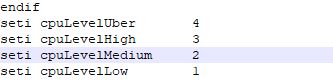
GraphicsRules.sgr Before Edit
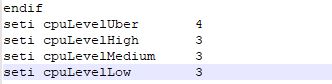
GraphicsRules.sgr After Edit
