
ALLOW GAME TO USE MORE GPU
THE SIMS 3


Guide by Anime_BoomLast Updated: 04/16/2025
This guide should be used to allow the game to harness more power from modern GPU's. If you are using a PC with a low end GPU or a PC that is not entirely meant for gaming this step should be skipped!
By default, The Sims 3 is set to use only 2GB of video ram. Many graphics cards as of late have up to 24GB of dedicated video random access memory (VRAM). If your card is in excess of the games default 2GB limit, you should follow this guide to increase the limit.
Edit GraphicsRules.sgr
1). Locate "GraphicsRules.sgr" at:
Steam: "Steam\steamapps\common\The Sims 3\Game\Bin"
EA App: "EA Games\The Sims 3\Game\Bin"
2.) Once there open "GraphicsRules.sgr" in notepad (or notepad ++ makes things easier to edit and find)
3.) When opened press "Crtl + f" a search bar will appear type in the search bar "seti textureMemory" and press enter.
4.) When located Change the number that is next to "seti textureMemory" you will see the number "2048" (2gb) this can be changed to the number value of "4096" (4gb). If the number is already at "4096" no changes are needed, setting the value any higher may not take effect due to the games 32bit nature.
5.) Save and exit the document.
GPU VRAM Formula: GB x 1024, so a 4090 with 24GB of VRAM would be 24 x 1024 = 24576.
You can set it to the max amount of VRAM you have, if you prefer, but it may not use all of the available video memory that is available to it.
Note - If your PC does not have a dedicated graphics card leave the value at "32".
Steam: "Steam\steamapps\common\The Sims 3\Game\Bin"
EA App: "EA Games\The Sims 3\Game\Bin"
2.) Once there open "GraphicsRules.sgr" in notepad (or notepad ++ makes things easier to edit and find)
3.) When opened press "Crtl + f" a search bar will appear type in the search bar "seti textureMemory" and press enter.
4.) When located Change the number that is next to "seti textureMemory" you will see the number "2048" (2gb) this can be changed to the number value of "4096" (4gb). If the number is already at "4096" no changes are needed, setting the value any higher may not take effect due to the games 32bit nature.
5.) Save and exit the document.
GPU VRAM Formula: GB x 1024, so a 4090 with 24GB of VRAM would be 24 x 1024 = 24576.
You can set it to the max amount of VRAM you have, if you prefer, but it may not use all of the available video memory that is available to it.
Note - If your PC does not have a dedicated graphics card leave the value at "32".
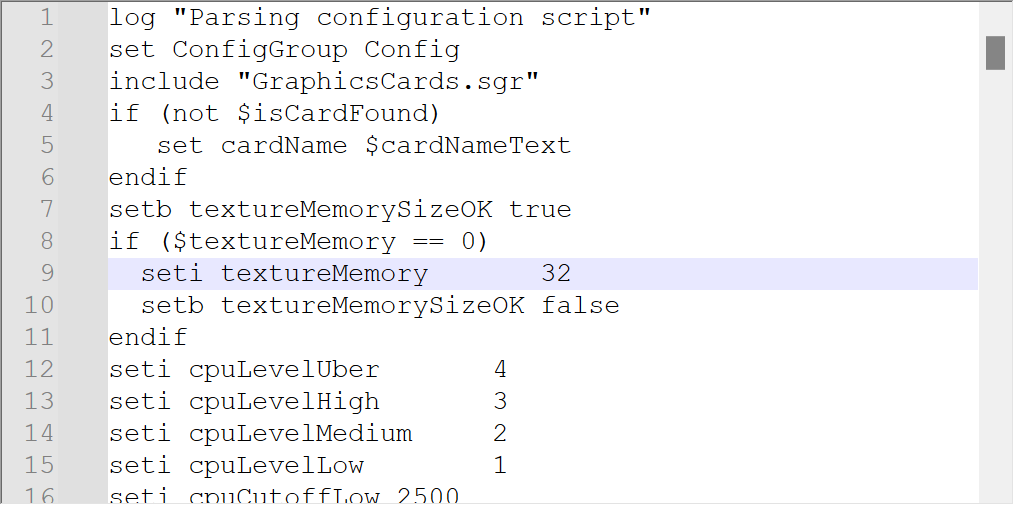
GraphicsRules.sgr Before Edit
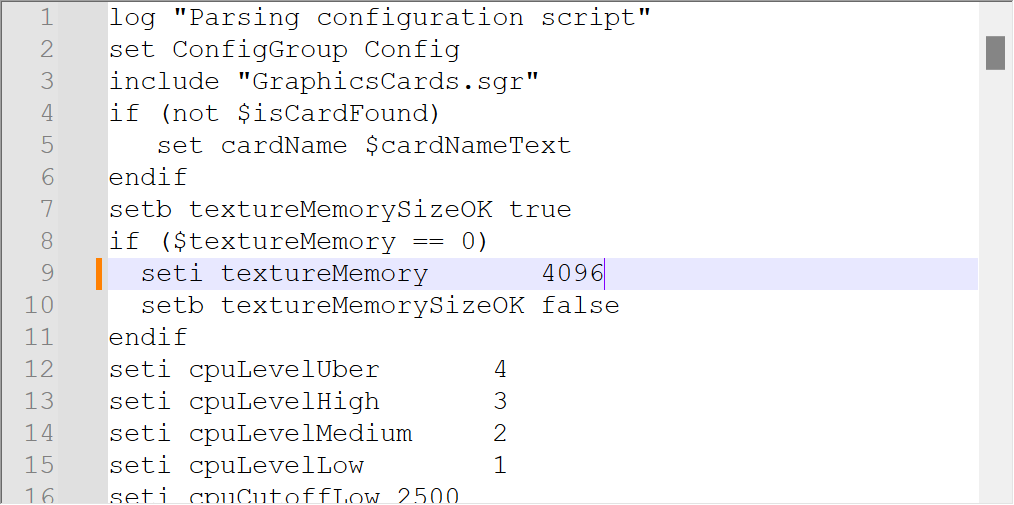
GraphicsRules.sgr After Edit
