
BEST IN-GAME SETTINGS
THE SIMS 3


Guide by Anime_BoomLast Updated: 04/16/2025
The game has some options that are on by default that can slow down the game if turned on. You may turn them off if you like.
Some of these options are useful. Determine which suit your needs, but understand that keeping each one enabled will come with an impact to your games performance.
Graphics Options
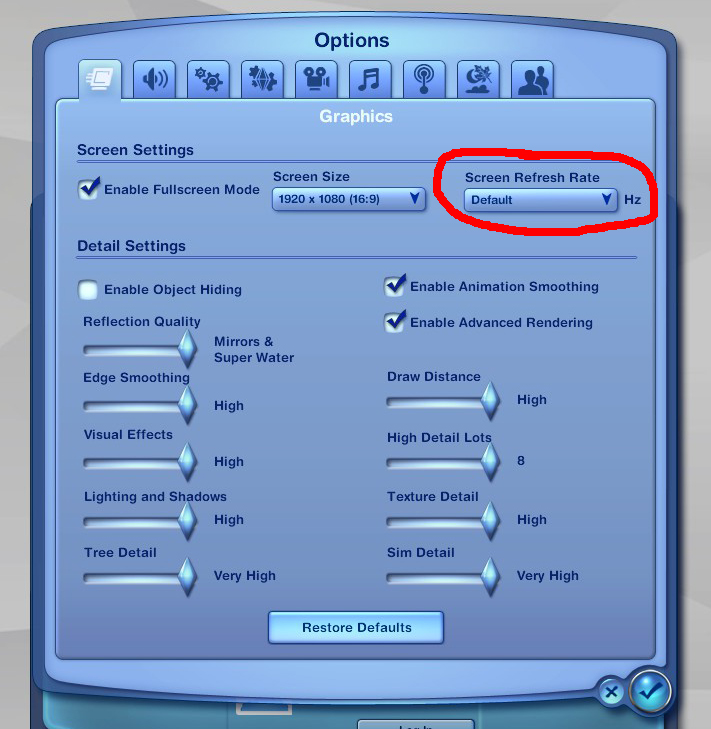
1.) Set the Screen Refresh Rate to Default. If you have used the NVIDIA or AMD Control Panel or the Smooth Patch to limit the games FPS, then Default will ensure the game does not exceed the frame rate specified when following that guide.
2.) All other settings in this menu can be set to whatever you like, or whatever your hardware can handle. However, the lower, the better your performance will be.
OPTIONAL: Unchecking Enable Fullscreen Mode, and running the game in windowed mode alongside a tool such as Borderless Gaming will allow you to more easily switch between other windows and not have to wait for the game to reload in full screen.
2.) All other settings in this menu can be set to whatever you like, or whatever your hardware can handle. However, the lower, the better your performance will be.
OPTIONAL: Unchecking Enable Fullscreen Mode, and running the game in windowed mode alongside a tool such as Borderless Gaming will allow you to more easily switch between other windows and not have to wait for the game to reload in full screen.
General Options
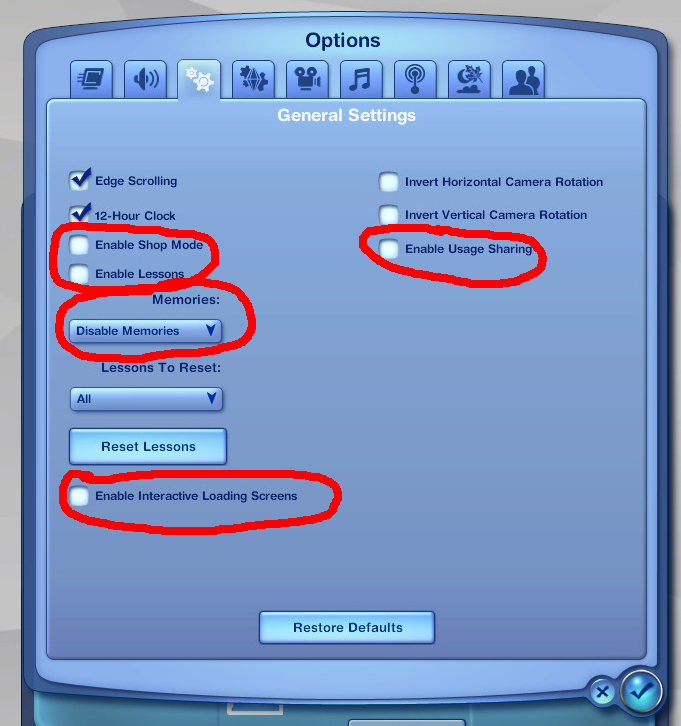
1.) Shop Mode option - Should be turned off for a lot of extra performance. Serves no other purpose than severely impacting the games overall performance.
2.) Interactive Loading Screens - This was a good concept but the final product can actually make loading up your game 3x longer, so disabling this option can make the game load your save file much quicker.
3.) Disable Memories - This feature is really good for story telling and legacy save files but it can become very laggy with every sim in town getting constant memories all the time setting this to off will help the games performance greatly. If you like this feature turned on but still want performance I would recommend looking at the mod No (or fewer) automatic memories [included in SimTools] this mod makes it so only important events in your sims life is saved and not useless ones.
2.) Interactive Loading Screens - This was a good concept but the final product can actually make loading up your game 3x longer, so disabling this option can make the game load your save file much quicker.
3.) Disable Memories - This feature is really good for story telling and legacy save files but it can become very laggy with every sim in town getting constant memories all the time setting this to off will help the games performance greatly. If you like this feature turned on but still want performance I would recommend looking at the mod No (or fewer) automatic memories [included in SimTools] this mod makes it so only important events in your sims life is saved and not useless ones.

Online/Social Options
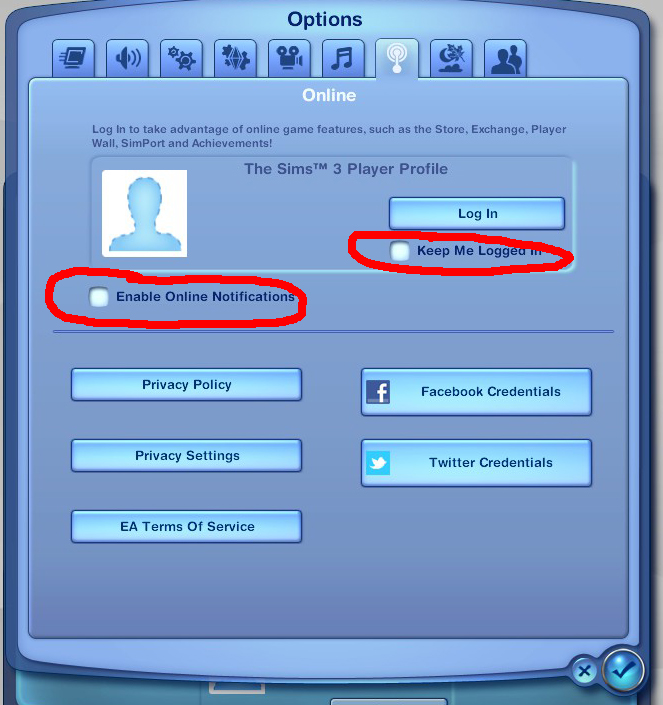
Turning off the options circled in red is highly recommend for performance since in game online stuff in the sims 3 was added poorly and results in a lot of lag on the games engine keeping the any online options off will improve performance greatly.
SimPort is fun, and probably the only worthy feature worth logging in for. Otherwise, leave everything disabled on this screen.
SimPort is fun, and probably the only worthy feature worth logging in for. Otherwise, leave everything disabled on this screen.
Advanced Demographics Options
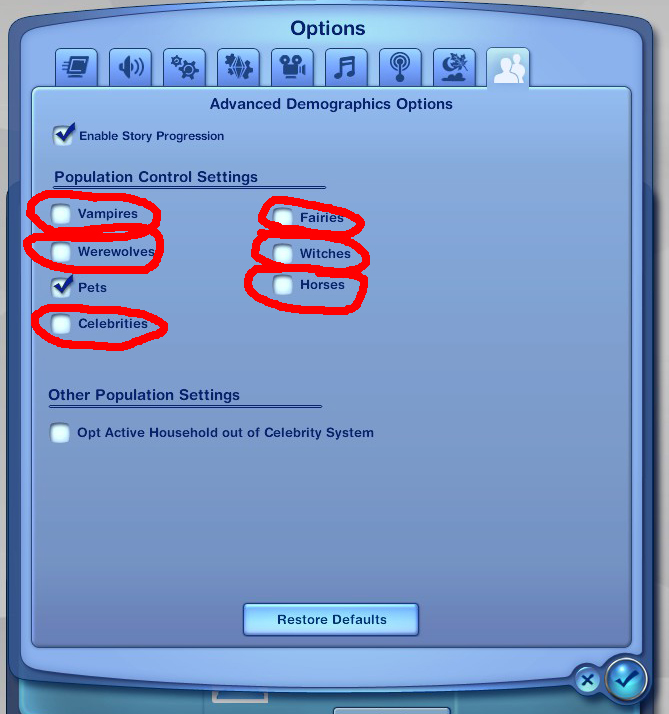
Turning the options off that I have circled in red can improve performance greatly this just means that sims that are not any of these life states can not be turned into them, sims that are already that life state can not turn other sims into that life state. Do not worry sims that are already; say a vampire will not be turned to a human again if turning vampires off.